
Best Audio Video Downloader for All Sites
Overview
The software is designed as a browser extension to enable users to download audio and video content from a wide range of websites. It supports platforms such as Weibo, Zhihu, Douyin, TikTok, NetEase Music, and QQ Music, making it a versatile tool for content consumers. The primary function is to extract media files directly from web pages, allowing users to save them locally for offline access. This addresses the common need for preserving digital content beyond temporary online availability.
Target users include individuals who frequently consume online videos and music, particularly those who rely on social media and streaming platforms. The tool is especially useful for users who want to build personal media libraries or access content without an internet connection. It also supports batch downloads, which streamlines the process for users managing multiple files.
Notably, due to copyright agreements, functionality has been disabled for certain platforms including Tencent Video, Youku, Tudou, iQIYI, LeTV, and Mango TV. This reflects the developer’s compliance with licensing requirements. The software operates within the browser environment, requiring no installation beyond standard extension setup.
Key Features & Capabilities
- Multi-Website Support – Enables downloading from popular platforms including Weibo, Zhihu, Douyin, TikTok, NetEase Music, and QQ Music.
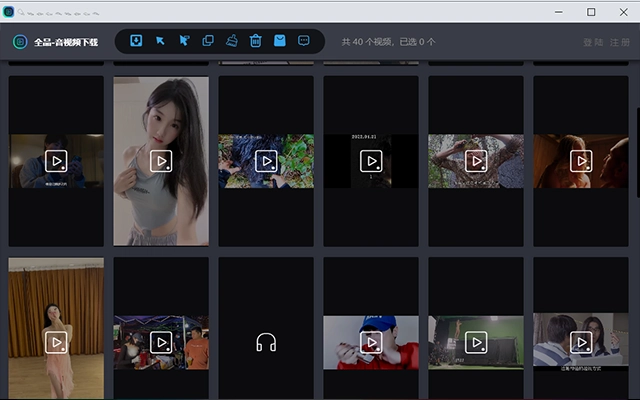
- Batch Download Functionality – Allows users to download multiple videos or audio files at once, improving efficiency for bulk content collection.
- Universal Media Extraction – Extracts both audio and video files from embedded content across supported sites.
- Browser Integration – Operates as a browser extension, integrating directly into the user’s browsing workflow.
- Compliance with Copyright Policies – Automatically disables downloads from platforms with active licensing restrictions, such as Tencent Video, Youku, and iQIYI.
For example, a user browsing TikTok can click the extension icon to initiate a download of a video in high quality. Similarly, a listener on NetEase Music can extract a song as an MP3 file with minimal steps. The batch feature is particularly helpful for content curators who need to collect multiple clips from social media feeds for later review or editing.
These capabilities reduce reliance on third-party downloaders or complex workarounds. The extension simplifies the process by working directly within the browser, minimizing setup time and user effort.
User Interface, Workflow & Performance
The user interface is minimal and designed for seamless integration with the browser’s toolbar. The extension icon appears as a small, intuitive symbol, typically located in the top-right corner of the browser window. Clicking it reveals a simple menu with options to initiate downloads or view recent activity.
Navigating the workflow is straightforward: users visit a supported website, locate the desired media, and activate the extension with a single click. The system detects the content and presents download options, including format and quality preferences where available. This streamlined process reduces friction and supports quick access to saved media.
Performance details were not specified by the developer. However, based on the extension’s size of 1.5 MB and its lightweight nature, it is expected to operate efficiently without significantly impacting browser performance. The developer did not provide additional system requirements or resource usage data.
Stability appears consistent with typical browser extensions, though real-world testing under heavy use was not documented. No reported crashes or compatibility issues were mentioned in the provided information.
Compatibility & System Requirements
The software is compatible with Windows, Mac, and Linux operating systems, ensuring broad accessibility across desktop environments. It functions as a browser extension, meaning compatibility depends on the supported web browsers, though specific browser versions were not listed.
The installation size is 1.5 MB, which is compact and suitable for users with limited disk space. The software version is 1.2.0, released on August 15, 2024. No hardware requirements were specified, and the developer did not provide details on minimum CPU, RAM, or storage needs.
Exact system requirements were not listed. Compatibility information was partially provided, with OS support confirmed for major desktop platforms. Users are advised to ensure their browser supports extensions and has updated security settings to allow installation.
Pros and Cons
Pros
- Supports a wide range of popular websites including TikTok, Weibo, and music platforms
- Batch download capability improves efficiency for multiple files
- Compact size (1.5 MB) ensures minimal storage impact
- Complies with copyright restrictions by disabling downloads on licensed platforms
- Free to use with no cost or in-app purchases
Cons
- Does not support downloads from major platforms like Tencent Video, Youku, and iQIYI
- No detailed performance or resource usage data provided
- Browser-dependent functionality; requires extension support
- Limited information on update frequency or long-term maintenance
- No official documentation or user guide included
FAQ Section
Is the software free to use?
Yes, the software is available at no cost. There are no fees, subscriptions, or in-app purchases required.
Which websites can I download from?
The extension supports downloading from Weibo, Zhihu, Douyin, TikTok, NetEase Music, QQ Music, and similar platforms. Download functionality is disabled for Tencent Video, Youku, Tudou, iQIYI, LeTV, and Mango TV due to copyright agreements.
Does it work on all browsers?
The software functions as a browser extension and is compatible with browsers that support extensions. Specific browser compatibility was not detailed, but it is designed for use on Windows, Mac, and Linux systems.
Can I download multiple files at once?
Yes, the extension supports batch downloads, allowing users to save multiple audio and video files in a single operation.
Is the software safe to install?
As a browser extension, it operates within the browser’s security model. It does not require administrative privileges or system-level access. Users should only install it from official sources to ensure integrity.
Final Thoughts
This browser extension stands out as a practical tool for users seeking to download audio and video content from supported websites. Its ability to handle multiple platforms and support batch downloads makes it a valuable asset for content collectors and offline users. The inclusion of compliance measures for copyrighted content demonstrates responsible development.
While it does not support all major video platforms, its focus on widely used social and music sites ensures relevance for many users. The lightweight design and free availability further enhance its appeal.
For individuals who regularly save videos or music from platforms like TikTok, Weibo, or NetEase Music, this tool offers a simple, efficient solution. It is particularly well-suited for students, content creators, and casual users who value offline access to digital media.
Download Best Audio Video Downloader Tool now







